
How to Turn a Photo into a Sketch Using AI
Thanks to AI tools, transforming a photo into a pencil sketch is now something anyone can do. The process is straightforward, but the key lies in crafting a well-phrased prompt and choosing the right model. Here’s a practical guide based on our firsthand experience. Step one: pick the right tool. Step two: write a prompt that clearly communicates your goal.
We started with aistudio.google.com, Google’s experimental platform for generative AI. Among the available models, we chose Gemini 2.0 Flash (Image Generation Experimental), and set the temperature to a mid-level value - striking a balance between creativity and control. In this context, “temperature” adjusts how imaginative the output is. A medium setting offers the sweet spot between realism and stylization.
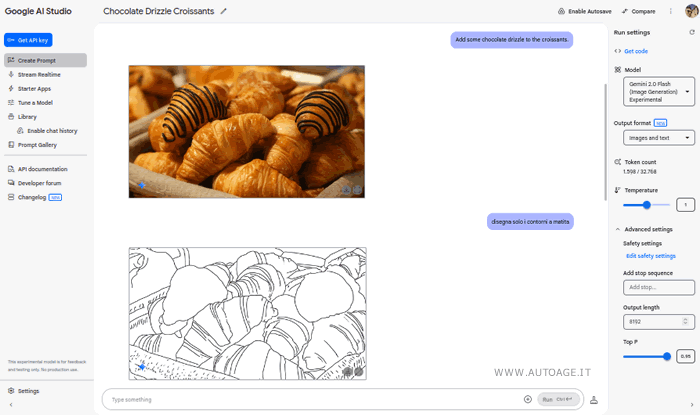
Once the model is set up, you simply upload your photo and enter a prompt. Our first test was with a photo of croissants. After uploading the image, we used this simple, direct prompt:
“Draw only the pencil outlines on a white background.”
The result? Excellent. The croissants were rendered as a clean, precise line drawing - minimal yet expressive, as if sketched by hand.
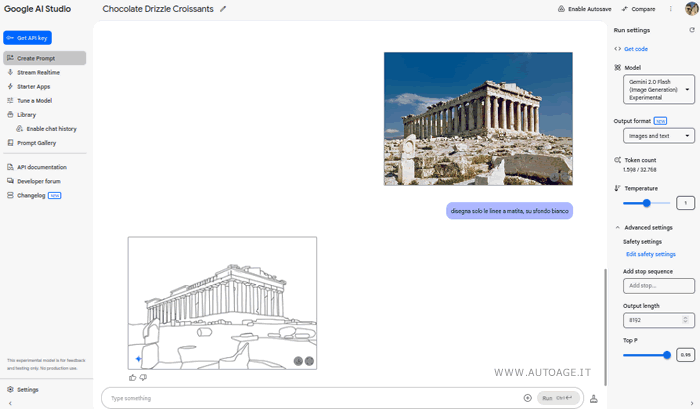
To test consistency, we tried a second image - a photo of the Parthenon in Athens. This time, we tweaked the prompt slightly while keeping the same intent:
“Draw only the main pencil lines on a white background, like a technical sketch.”
Again, the outcome was impressive: the Parthenon emerged as a refined architectural drawing, built from clean, evocative lines - ideal for design studies, artistic concepts, or visual storytelling. The final sketch was crisp, clear, and ready to save or print.
The real magic doesn’t just come from the tool - it’s all about how you write the prompt. Specificity is everything. In our case, the critical instructions to include were:
- Pencil sketch: to avoid any digital coloring or effects.
- Only the outlines or main lines only: to strip away shading and unnecessary detail.
- White background: to keep the image clean and versatile - ideal for printing, layout design, or other creative uses.
Of course, Google AI Studio isn’t the only option. There are several other AI tools out there, like DeepAI Sketch Filter, Fotor AI Sketch Generator, and Picsart AI Tools. No matter which one you use, the quality of the prompt is what makes or breaks the result. Even the most advanced model won’t deliver great output if the instructions are vague or inconsistent.
In the end, turning a photo into a sketch no longer requires pencils, paper, or advanced photo-editing skills - just a well-thought-out prompt and a solid AI tool. Whether you're working with a simple pastry or a historical landmark, AI can deliver a stylized, artistic version of your image - perfect for creative projects, concept art, storyboards, or just for fun. Writing a good prompt is like giving direction to a skilled illustrator: the clearer you are, the closer the final sketch will match your vision.


